
Interior design software: why 9 tools could be 1 system
Most interior design firms run on 9 disconnected tools glued by a spreadsheet. There's a cleaner shape for the same work — here's what it looks like.
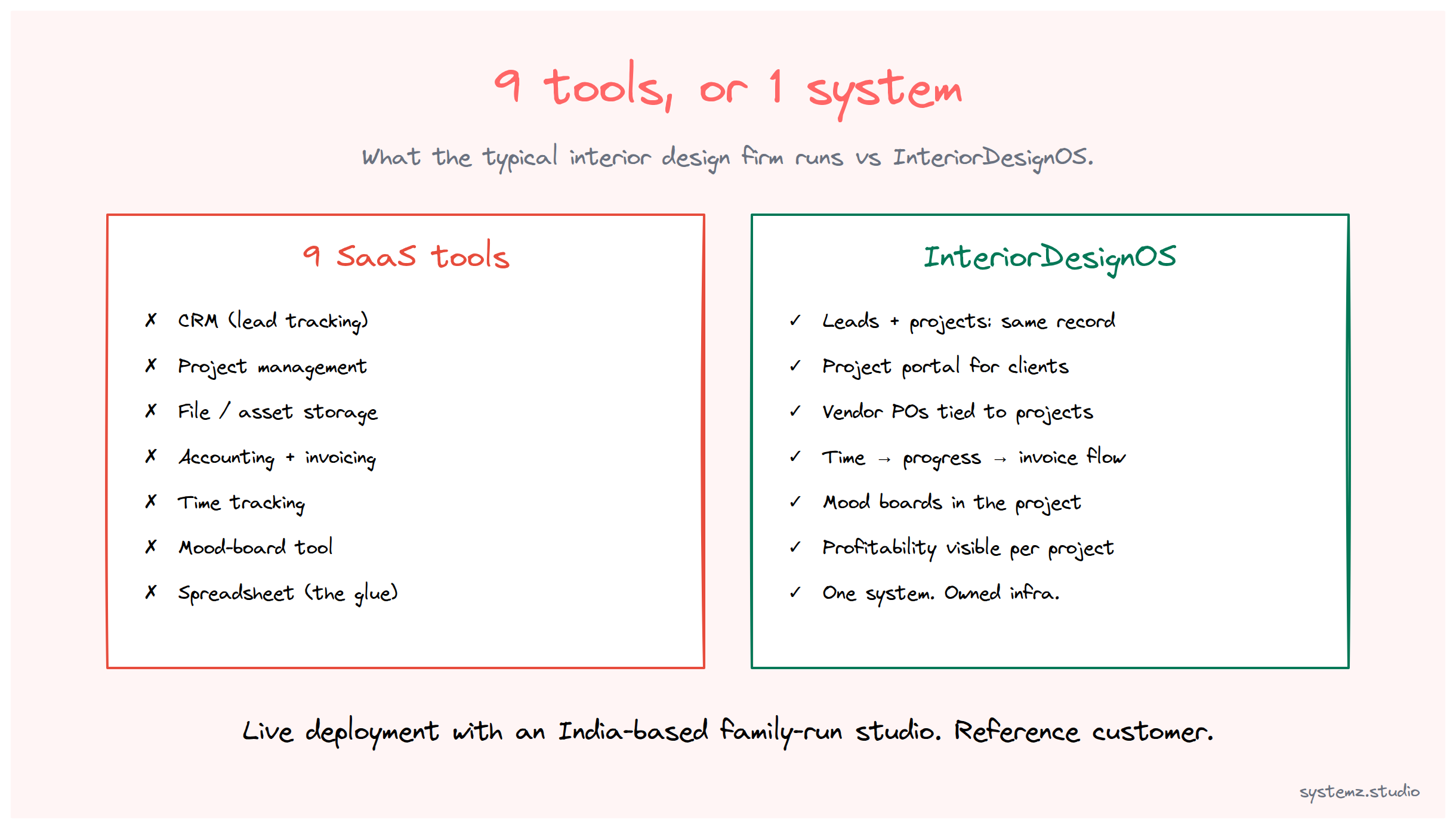
Walk into the operations of a typical mid-sized interior design firm and count the software tools.
We’ve done this exercise enough times to know the answer is rarely below 7, often closer to 9, and sometimes 12. Each tool is competent at the thing it does. Together they create a category-of-tool we’ll call integration-tax, and that tax is what InteriorDesignOS exists to remove.
This is what one of those operations actually looks like, and what it looks like after.
What 9 tools really means
Here’s the realistic stack for an interior design studio with 8–25 staff:
- CRM — for tracking leads from showroom visits, referrals, and Instagram inquiries
- Project management — for tracking each active project’s milestones, deliverables, and team assignments
- File / asset storage — for client uploads, vendor catalogs, design boards, contracts
- Accounting — for purchase orders, vendor invoices, client invoicing
- Time tracking — for billing hourly work and tracking team capacity
- Communications — for client messaging that doesn’t get lost in email
- Mood-board / visualization tool — for showing clients design concepts
- Calendar / scheduling — for showroom appointments and on-site visits
- Spreadsheet — for the parts the other 8 tools don’t handle, which is a lot
That’s before counting the email marketing tool, the social scheduling tool, and the Bitcoin payment processor (if the firm is forward-leaning enough to accept BTC).
Total monthly software bill, for a typical studio: somewhere between $400 and $1,200.
But the bill isn’t the actual cost. The actual cost is the integration tax: every project requires data to live in two or three of these tools simultaneously, and most of the team’s “admin time” is spent moving data between them or reconciling discrepancies when the tools disagree.
What the work actually looks like
Step through a typical project lifecycle:
- Lead inquiry comes in (Instagram DM, referral, walk-in). Goes into the CRM.
- First consultation booked. Calendar event created, separately. Client portal access provisioned, separately.
- Brief captured. Lives in a Google Doc that the CRM doesn’t link to cleanly.
- Mood boards built. Design tool, separate from everything else. Client has to log in to a third URL to see them.
- Project approved. Project management tool gets a new project. The CRM doesn’t know.
- Vendor purchase orders. Accounting system. Doesn’t know about the project’s milestones.
- On-site execution. Time tracking starts. Project tool gets updates. Accounting still doesn’t know.
- Progress invoicing. Hand-prepared in accounting, with someone manually pulling progress data from the project tool.
- Project closeout. A final summary lives in the project tool. The CRM doesn’t get marked.
That’s 8 systems touching one project. The “spreadsheet” is what holds the cross-tool reality together — usually maintained by the operations lead and updated whenever one of the tools drifts.
If you’ve run a design studio, you’ve felt this. If you haven’t, take any one of those 9 steps and imagine your team manually doing the data-handoff.
What InteriorDesignOS replaces
InteriorDesignOS is a SystemZ vertical product. It’s a complete operating system pre-configured for the way an interior design firm actually works. Not a generic ERP with a “design” template painted on top — a system whose primary entities (projects, clients, vendors, mood boards, line items, on-site visits) match what the studio team already tracks.
In the same project lifecycle:
- Lead inquiry lands in the system as a Lead doctype. The CRM is the system.
- First consultation is a calendar event tied to the lead. Same system.
- Brief is a structured field on the lead/project, not a separate Google Doc.
- Mood boards are attached to the project, viewable by the client through their project portal which is part of the system.
- Project approval converts the lead to an Active Project — same record, status changes.
- Vendor purchase orders are POs in the same system, tied to the project, posting to the project’s costing automatically.
- On-site execution logs time against the project, updates progress against milestones.
- Progress invoicing pulls automatically from the project’s milestones and time logs. One click, no spreadsheet.
- Project closeout updates the project status, marks the client as a past-relationship, archives the working files.
That’s not a fantasy roadmap. That’s the system, today, configured for interior design specifically. Every doctype, every workflow, every report, every permission has been shaped for this vertical.
What changes when a studio moves over
InteriorDesignOS is live. We have a working deployment running for an India-based family-run interior design studio in our family pipeline — the original customer who let us shape the system around how they actually work. That deployment is the reference; the patterns below come from running it, not from forecasting.
Three things change when a studio moves to InteriorDesignOS:
1. Admin overhead drops. The hours that used to go into reconciling tools, updating spreadsheets, and chasing data-handoffs collapse. The size of the drop depends on how integration-tax-heavy the prior stack was, but it’s measurable from week one.
2. The “is this project profitable?” question becomes answerable. When time tracking, vendor POs, and client billing all live in the same system, project margin is a visible number — not a quarterly reconciliation exercise. Studios that didn’t know which projects made money learn which ones don’t.
3. The software bill simplifies. From the typical 9-tool SaaS stack to a single deployment on infrastructure the studio runs. The cost saving is real, but, frankly, secondary to (1) and (2).
What’s not in the box
Honesty matters here. InteriorDesignOS doesn’t replace:
- Your design tools. SketchUp, AutoCAD, the rendering software your designers actually use — those stay. The system stores the outputs, doesn’t replace the production environment.
- Your bookkeeper. The accounting module is real and works, but a human still needs to close the books. The system is a workspace, not a CPA.
- Your relationships. No software replaces the showroom, the trust, the taste, the eye. It just removes the tax that’s currently sitting between you and that work.
What it does replace is the disconnected SaaS stack and the integration tax that comes with it.
How implementation works
InteriorDesignOS deploys in 2–4 weeks, not 6–12 months. That timeline is possible because the doctype structure, workflow definitions, and report templates are pre-built.
Implementation is:
- Discovery (3–5 days). We map your specific terminology, your project stages, your vendor relationships, and any custom processes that need to fit the standard model.
- Configuration (1–2 weeks). Apply your terminology and workflow customizations. Migrate active projects from the existing tools.
- Training (2–3 days). Team learns the system, in their actual roles, on their actual data.
- Go-live + first 2 weeks of close support. We’re available daily as your team finds the rough edges in their first projects on the new system.
After that, the studio runs itself. We’re available for monthly check-ins, questions, and the occasional customization request.
Who this is for
InteriorDesignOS is right for studios with:
- 5–50 staff (smaller works; larger needs a tier-up conversation)
- Active project pipelines (not single-project boutique work)
- Mixed billing models — fixed-fee design, hourly project management, vendor margin
- Frustration with the current tool stack, and budget to migrate
It’s not right for solo operators (you’ll want simpler tools), or for very large national firms (different tier of operations).