2 weeks vs 12 months: what changes when an ERP is already configured for your industry
Traditional ERP implementations take 6-12 months because they're starting from a blank slate. SystemZ vertical products start at week 2 of someone else's project — and we have the live deployment to prove it.
The ERP industry has trained business owners to expect software implementations that take half a year minimum and often a full year. That’s the cheap end. The expensive end runs to 18 months and seven figures.
That timeline isn’t an accident or incompetence. It’s the natural consequence of buying generic software and configuring it for a specific business from scratch.
SystemZ vertical products take 2–4 weeks because we start at a different starting line.
This piece is about what’s actually in those two timelines, and why the difference matters more than the upfront cost saving.
What the 6–12 months actually contains
Most of a traditional ERP implementation isn’t engineering. It’s translation:
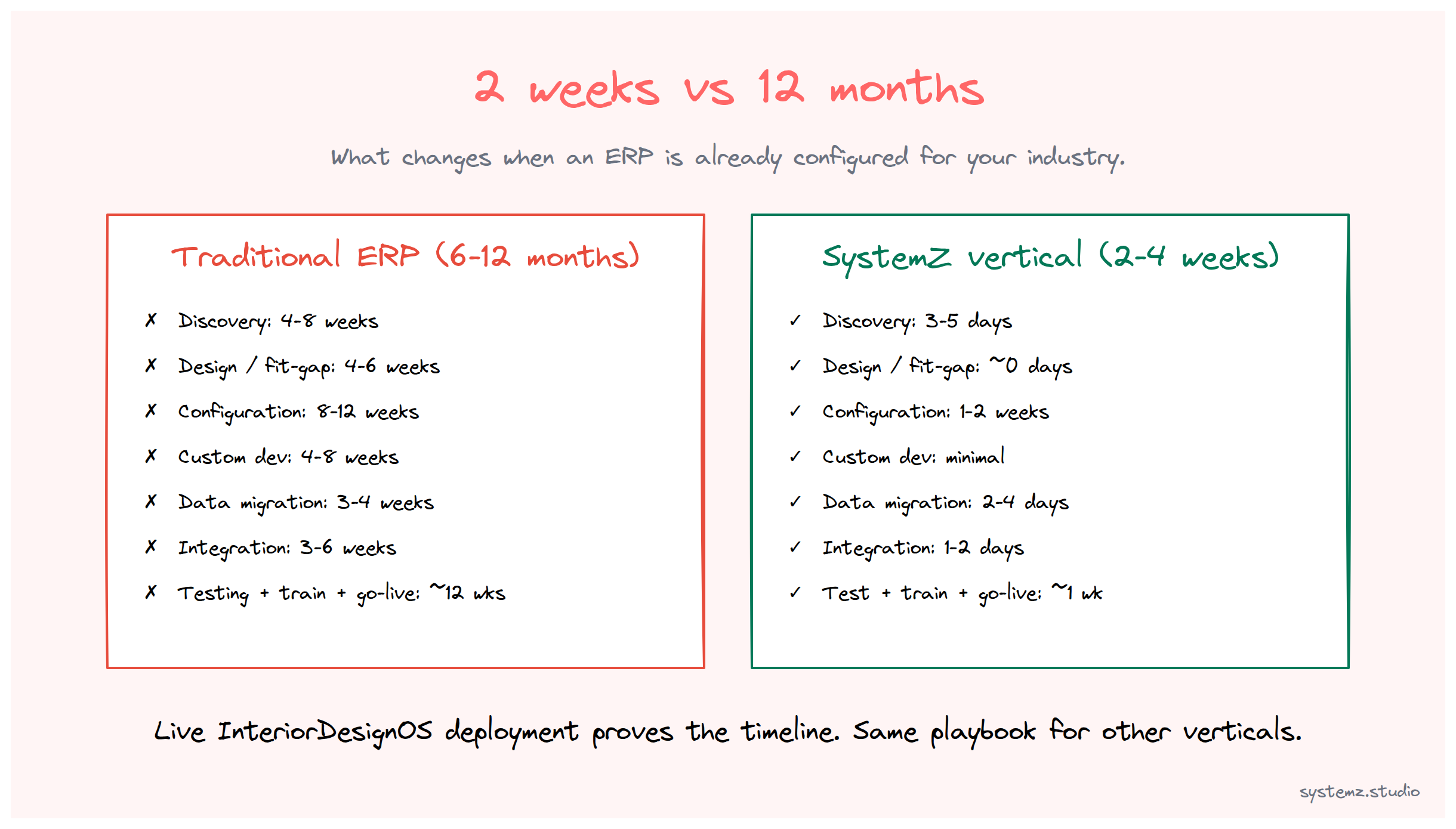
- Discovery (4–8 weeks): consultants interview your team to learn how your business works. They produce a 200-page requirements document.
- Design / fit-gap analysis (4–6 weeks): consultants compare what your business needs against what the generic ERP does out of the box. They identify gaps. Each gap is either a customization, a workaround, or a “you’ll have to change your process to match the system.”
- Configuration (8–12 weeks): consultants set up the chart of accounts, the doctypes, the workflows, the role permissions, and the report templates. For a generic ERP, this is invented largely from scratch.
- Custom development (4–8 weeks, parallel): the gaps that couldn’t be configured become custom code. New screens, custom workflows, integrations with your existing systems.
- Data migration (3–4 weeks): spreadsheet exports from old systems get cleaned, mapped, and imported. This part always takes longer than estimated.
- Integration (3–6 weeks): the new ERP gets connected to payment gateways, e-commerce, marketing tools, banking systems, and whatever other surfaces your business relies on.
- Testing (4–6 weeks): UAT with your team, bug fixes, refinement.
- Training (2–3 weeks): end-user training across departments.
- Go-live + stabilization (4–8 weeks): a noisy period where everything is partly working, partly broken, and consultants are responding to fires.
Total: 32–56 weeks of calendar time. 6–12 months in marketing-speak.
That’s if it goes well. Stalled implementations and 18-month timelines come from any of these phases extending — usually because the discovery missed something, or the customizations turned out harder than estimated, or the data migration uncovered ten years of dirty data.
What we skipped
The 2–4 week SystemZ timeline is possible because most of those phases are already done — for someone else’s project, for someone else’s business, but in the same vertical.
Specifically:
- Discovery (your project): 3–5 days. Not 4–8 weeks. We’re not learning how interior design firms work in general; we’re learning how yours works in particular. The shared 95% is already in the system.
- Design / fit-gap analysis: ~0 days. The system is already designed for your vertical. The gaps that matter are the small percentage where your business diverges from the typical pattern.
- Configuration: 1–2 weeks. Not 8–12. Apply your terminology, your specific workflow tweaks, your branding. The doctypes, the underlying workflows, the role permissions, the reports — all pre-built.
- Custom development: typically near-zero in the first month. If something is genuinely unique to your business, we add it post-go-live, on a timeline that doesn’t block production.
- Data migration: 2–4 days. The data shape we’re importing into is already known. We don’t have to design import templates from scratch.
- Integration: 1–2 days for standard integrations (the payment gateway, the email system). Custom integrations come later if needed.
- Testing: 2–3 days of focused review with your team on real workflows in their real roles.
- Training: 2–3 days. Not 2–3 weeks. The training curriculum is already built; we’re applying it to your team.
- Go-live + close support: 2 weeks of daily availability as your team uses the system on real projects.
Total: 2–4 weeks of calendar time.
The number isn’t smaller because we work faster. It’s smaller because most of the work was already done — by us, on prior projects in the same vertical, paid for by us, absorbed into the SystemZ product.
What’s the same — and what isn’t
Things that don’t change between SystemZ and traditional ERP:
- The core capability set. Inventory, accounting, projects, CRM — all there.
- The data ownership. Your business data is yours, on infrastructure you control.
- The need to actually use the software. Time saved on implementation doesn’t help if your team doesn’t adopt it.
Things that do change:
- The starting point. SystemZ starts at “configured for your vertical.” Traditional ERP starts at “blank slate, customize for you specifically.”
- The risk profile. Long implementations have high risk of partial-success outcomes. Shorter implementations have less surface area for things to go wrong.
- The cash-flow shape. A 2–4 week implementation lets you start measuring outcomes within a quarter. A 6-month implementation often doesn’t show ROI until a year out.
- The team disruption. Two weeks of calendar time means two weeks of your team being partially diverted. Six months means a long period of “we’re in the middle of an ERP project” affecting all decision-making.
Where SystemZ doesn’t fit
Honesty matters here. The 2–4 week timeline assumes:
- Your business is a reasonable fit for the vertical product. If you’re a hybrid (design-build firm doing 50% interior design and 50% general contracting, for example), the off-the-shelf vertical product might cover only half. We’d recommend a Simbotix-parent custom engagement instead.
- Your existing data is reasonably clean. If your last 10 years of data lives in 12 spreadsheets with inconsistent customer records, the migration phase will extend.
- Your team has bandwidth for the 2–4 week intensity. A shorter implementation is more concentrated. If your operations lead is fully booked on client work, the project can’t fit a 4-week window.
When SystemZ doesn’t fit, the right answer is usually AppZ + custom Simbotix-parent development — the same underlying stack, configured to your specific business rather than your generic vertical. That’s a longer project (3–4 months typically), but still meaningfully shorter than traditional ERP because the foundation is already operational.
What we recommend
If you’re evaluating ERP and the timelines you’re hearing start with “6 months” — ask three questions:
- Is there a vertical-specific product for my industry? If yes, the timeline starts at 2–4 weeks. If no, the timeline is whatever the consultants quote.
- What percentage of the configuration is reusable from prior projects? If the answer is “from scratch,” you’re paying for someone else to invent your industry’s playbook.
- What’s the actual go-live risk? Long implementations have a long tail of “partial-success” outcomes. Short implementations have a short tail.
For interior design, the 2–4 week answer is concrete. InteriorDesignOS is live for an India-based family-run interior design studio in our pipeline — the reference deployment from which the product was shaped. Other verticals (rentals, clinics) follow the same pattern; we extend the catalog as customer demand and field experience accumulate.
If your industry is already covered, the timeline is what the article describes. If it isn’t, talk to us — building the next vertical OS is faster than you’d expect when the underlying infrastructure (Frappe, ERPNext, the AppZ deployment layer) is already operational.